tl;dr
I built codesherpa, a code interpreter plugin for ChatGPT. ChatGPT writes the code, and a small FastAPI server running on your machine executes it and sends back the result. No cloud service, no sandbox I have to pay for, just localhost.
- The code is on GitHub
- It works with ChatGPT’s “Develop your own plugin” option, so you need plugin developer access to use it as a plugin.
- There is also an experimental standalone UI that uses the OpenAI API and function calling instead.
Introduction
On March 23, 2023, OpenAI announced ChatGPT plugins. Third party plugins from Expedia, Instacart, Wolfram and others, plus two plugins OpenAI built themselves: a web browser and something called Code Interpreter. Access was a limited alpha with a waitlist, both for people who wanted to use plugins and for developers who wanted to build them. I put my name down as a developer.
Code Interpreter was the one that got my attention. From the announcement:
We provide our models with a working Python interpreter in a sandboxed, firewalled execution environment, along with some ephemeral disk space.
In other words, ChatGPT could write code, run it, look at the output, and keep going. Upload a CSV and get charts back. Ask a math question and get an actual computed answer - not a confident guess. The demo video showed it doing exactly that kind of math and data analysis.
I didn’t have access to it. I’d been paying for ChatGPT since January1, and still no Code Interpreter. Meanwhile I kept seeing posts and screenshots from the people who did.
So, I wanted Code Interpreter, I didn’t have Code Interpreter, and OpenAI had just told everyone how to build plugins. You can probably guess where this is going.
How Plugins Work
A ChatGPT plugin is surprisingly straight-forward. It’s an HTTP API plus two files:
- A manifest at
/.well-known/ai-plugin.json. It has a name, a logo, an auth type, a link to your API spec, and adescription_for_modelfield, which is basically a prompt telling the model what your plugin does and when to use it. - An OpenAPI spec describing your endpoints.
ChatGPT reads both, and when a conversation calls for it, the model decides to call one of your endpoints with JSON it wrote itself. Your API responds, and the model reads the response and continues.
So at its core, a code interpreter plugin is just this loop:
- Model writes code
- Something runs the code
- The output goes back to the model
The model already does step 1 pretty well. I just needed to build step 2: an endpoint that takes code and returns what it printed.
By early May I was off the developer waitlist, which unlocked “Develop your own plugin” button in the plugin store. And importantly, you can point that at localhost. I made the first commit to codesherpa on May 6, 2023.
Version 0: A REPL in a FastAPI Endpoint
The first version was one file, main.py. Two endpoints: /repl to execute python, and /command to run shell commands. Python’s standard library has a code module that gives you an interactive console, the same thing behind the >>> prompt, so I used that:
main.py (first commit, trimmed)
class CodeExecutionRequest(BaseModel):
    code: List[str]

persistent_console = code.InteractiveConsole()

def execute_code_in_repl(code_list: List[str]) -> str:
    output = io.StringIO()

    try:
        with redirect_stdout(output), redirect_stderr(output):
            for code_line in code_list:
                persistent_console.push(code_line)
        result = output.getvalue()

    except Exception as e:
        result = str(e)

    return result
The console lives as long as the server, so state persists between requests. Define df in one message, use it three messages later. That part worked great.
The List[str] part did not. InteractiveConsole.push() behaves exactly like you typing at a >>> prompt, one line at a time. And at the prompt, a block like a for loop isn’t finished until you enter a blank line. The model doesn’t know that, so it sends perfectly valid python like:
{
  "code": [
    "for i in range(3):",
    "    print(i)",
    "print('done')"
  ]
}
and gets back:
  File "<console>", line 3
    print('done')
    ^^^^^
SyntaxError: invalid syntax
On top of that, my description_for_model had to teach the model to send code as an array of escaped strings, with an escaped JSON example inside the description. It was ugly. Later I tried splitting lines on ; so the model could cram more onto one line, which of course breaks the moment there’s a semicolon inside a string. Not my finest hour.
The other annoying thing: the model didn’t call the plugin every time. Sometimes it would just answer without running anything, so it was basically unpredictable at first, though it seems to have improved since.
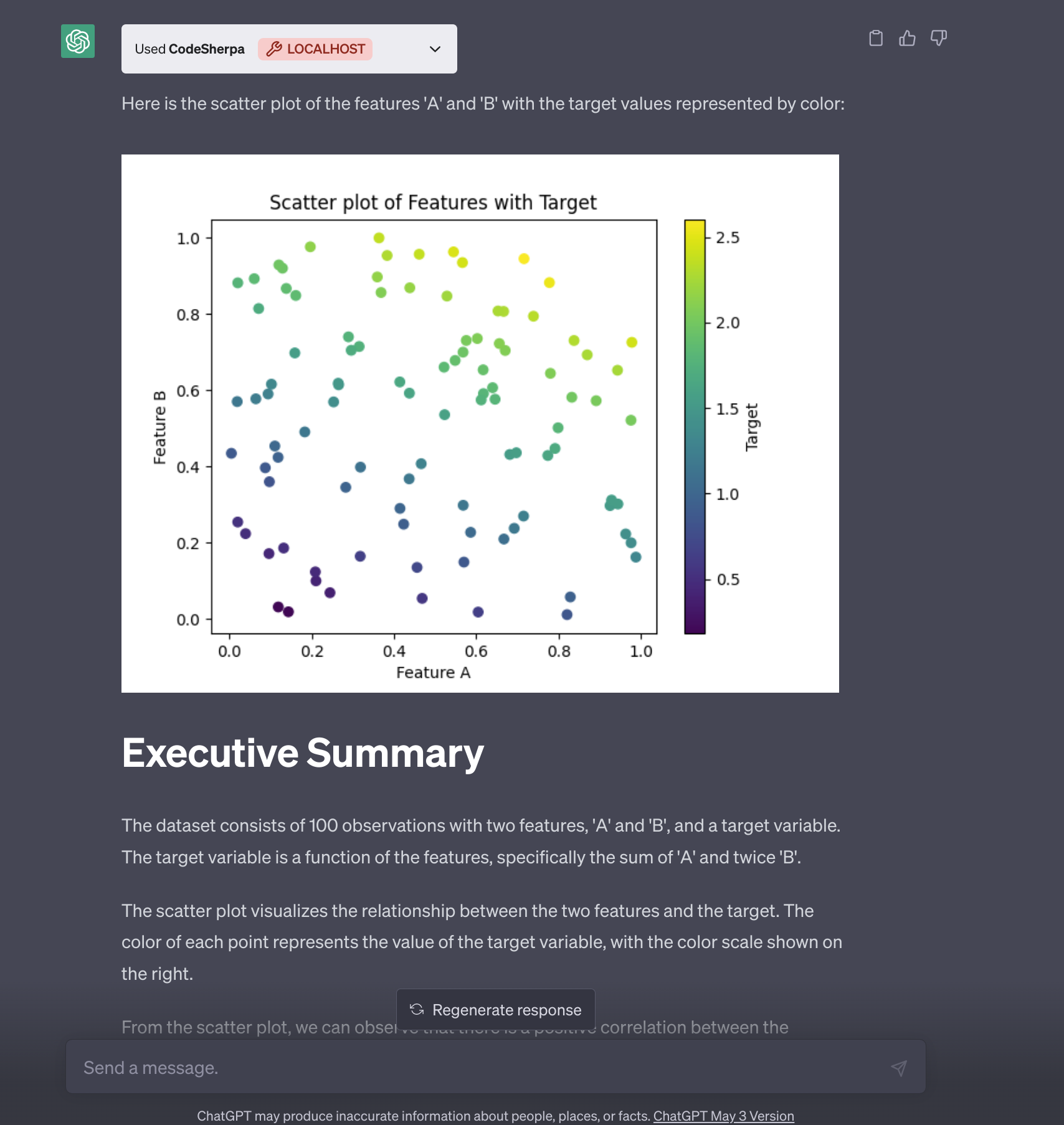
Still, it worked well enough for a first demo - which was basically me ripping off OpenAI’s Code Interpreter demo to see if I could primitively recreate it. Here’s ChatGPT generating a dataset, plotting it, and writing an “executive summary”, all through codesherpa running on my laptop:
May 6, 2023. Note the little “LOCALHOST” badge.
Detour: Should This Run in the Cloud?
Here’s where I spent a couple weeks going down a path I shouldn’t have, and one I eventually threw away.
My first instinct was that a plugin should be a service. Other people install it from the plugin store, it calls my server, done. That was the plan, anyway:
- May 7: deployed to Heroku (
codesherpa.herokuapp.com). - May 7, later that day: discover that Heroku isn’t free anymore.
- May 11: wrote up a spec for bearer token auth and a
ContainerManagerthat would spin up a separate docker container per user, so strangers’ code wouldn’t share a process. - May 14: moved to a custom domain, setup
service_httpauth in the manifest, added rate limiting (5 requests a minute with slowapi), and split code execution into its own Google Cloud Run service. - May 16 to 21: moved to Google App Engine, with the auth key in Secret Manager, and filled in OpenAI’s verification token. My commit message for that one was “Prod time”.
Ten days later I deleted the whole server/ directory.
A few things killed it. Here’s roughly what was going through my head at the end of May. The big one is simple: yes, OpenAI is already planning to do this at scale in some form (please give me access!). On May 12 OpenAI started rolling out browsing and plugins to all Plus users, “moving from alpha to beta” as they put it. Code Interpreter wasn’t part of that rollout. As OpenAI’s Logan Kilpatrick put it on the developer forum on May 25:
The code interpreter plugin is not available yet to everyone. It is in a limited alpha.
So the real thing is clearly coming, I just don’t know when.
Second, I’m one person with a hobby budget. A code interpreter is, by definition, a remote code execution service. Running arbitrary code from anyone with a ChatGPT account, on infrastructure I pay for, means real sandboxing, resource limits, locking down network access, cleaning up disk, monitoring, and a cloud bill that grows with every user. That’s OpenAI’s “sandboxed, firewalled execution environment”, and they have a few more engineers (and GPUs, and dollars) than I do. My container spec had a “Security” section that was basically a TODO list. Paying to host a rougher version of a feature OpenAI is going to hand every Plus subscriber eventually doesn’t make a lot of sense.
Third, state. The Cloud Run service just runs each line with python -c, so nothing persists between lines, let alone between requests. Fixing that means mapping users to long-lived sessions. But with service_http auth, OpenAI sends your token with every request, the same one for everyone, so the token can’t tell users apart. Per-user containers would need real user auth (OAuth) on top of everything else. Doable? Yes. But again, see the first reason I killed this idea.
Fourth, files. The whole point of something like this is “here’s my spreadsheet, tell me about it”. If the code runs in my cloud, your files have to go there too.
And then it clicks: everyone who can use a localhost plugin already has a perfectly good machine sitting right there. Their compute, their disk, their bill.
Also, honestly, I’m more interested in OpenAI’s impending Code Interpreter than in anything anyone else is going to whip up right now. But hey, using my own machine for some simple compute will be a fun stopgap until 1) I get access, or 2) They release it to everyone.
Local Only
So codesherpa went local-only, and that’s how it’s stayed. You run the server yourself, in docker or directly, and point ChatGPT’s “Develop your own plugin” at localhost:3333.
The interesting part is how a localhost plugin even works, since OpenAI’s servers obviously can’t reach your laptop. For plugins in development on localhost, the API calls are made from the ChatGPT page in your browser. That’s why the server has to allow CORS from https://chat.openai.com:
localserver/main.py
PORT = 3333

origins = [
    f"http://localhost:{PORT}",
    "http://localhost:3002",
    "http://localhost:3001",
    "http://localhost:3000",
    "https://chat.openai.com",
    "https://chat.openai.com/?model=gpt-4-plugins",
]
(yeah, that last one is a URL with a query string in a list of origins. It does nothing. I’m leaving it in as a monument, because yeah.)
This has a nice side effect for images. When the model makes a plot, codesherpa saves it to static/images/, which FastAPI serves as static files. The model then embeds it in its answer with a regular markdown image pointing at http://localhost:3333/static/images/plot.png. That image loads in your browser, from your machine. Uploaded files work the same way: there’s a small /upload page that saves files to static/uploads/, and the model knows to look there. This was fun! Kind of clunky, but who cares?
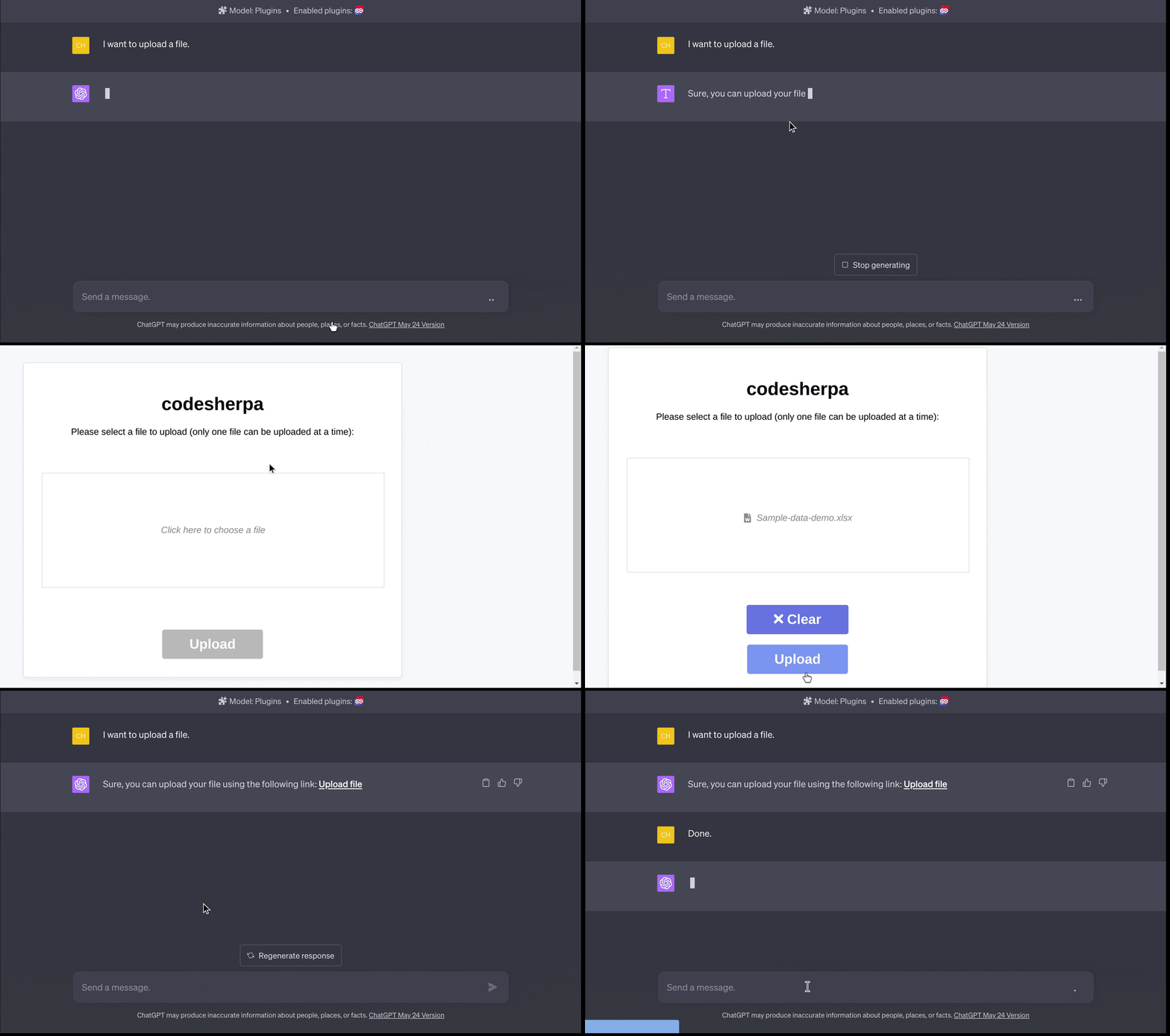
Asking to upload a file gets you a link to codesherpa’s upload page.
The trade-off is obvious. You can only use codesherpa as a plugin if you have plugin developer access, and you have to run a server. But in exchange:
- Your files never leave your machine.
- It’s your python enviroment. Need a package?
pip installit, via the/commandendpoint. No firewall. - No timeout, and files persist until you delete them.
- I don’t run anyone’s code but my own.
It also means /command really is a shell on your machine, and /repl really is exec() on code a language model wrote. That’s the point, but it’s also why the README says to use the docker image, and calls running it directly “potentially risky!”. You are letting ChatGPT use your terminal. Act accordingly.
The REPL, Take Two: Abstract Syntax Trees
Back to the line-by-line problem. Around May 20 I switched the request from a list of lines to a single string, and refactored code execution into executor classes, one per language, because why not add C++ and Rust while I’m at it. The first Python executor wrote the code to script.py and ran it in a subprocess. That fixed the indentation problem, and broke state, since every request was a brand new process.
What I actually wanted was the best of both:
- Accept a whole block of code as one string, so the model can write normal python.
- Keep variables around between requests.
- Behave like a REPL (or a Jupyter cell): if a line is just an expression, like
df.head(), show its value without needingprint(). I’ve never actually used Jupyter, but I’d seen so many folks use it that the behavior seemed worth replicating, because why not.
Number 3 is the subtle one. If you exec() a string, df.head() gets evaluated and the result is thrown away. If you eval() it, you get the value, but eval() only accepts a single expression, not statements like import or x = 5. You need to know, for each statement, which kind it is. That’s exactly what an abstract syntax tree tells you.
I never really liked reading about abstract syntax trees (ASTs) until this point! Why? Because I was solving a problem I actually had, and that made it enjoyable. (Re)learning something in pursuit of solving a problem is the best way to learn.
What the tree looks like
Python’s ast module parses source into a tree of nodes without running anything. Lets take a typical snippet ChatGPT might send:
import pandas as pd
df = pd.read_csv('static/uploads/music.csv')
df.head()
ast.dump(ast.parse(code), indent=2) gives you:
Module(
  body=[
    Import(
      names=[
        alias(name='pandas', asname='pd')]),
    Assign(
      targets=[
        Name(id='df', ctx=Store())],
      value=Call(
        func=Attribute(
          value=Name(id='pd', ctx=Load()),
          attr='read_csv',
          ctx=Load()),
        args=[
          Constant(value='static/uploads/music.csv')],
        keywords=[])),
    Expr(
      value=Call(
        func=Attribute(
          value=Name(id='df', ctx=Load()),
          attr='head',
          ctx=Load()),
        args=[],
        keywords=[]))],
  type_ignores=[])
A Module with a body, which is a list of top-level statements: an Import, an Assign, and an Expr. That last one is the key. In Python’s grammar, a line that is just an expression, like a function call on its own line, is wrapped in an Expr statement. So by walking tree.body, I can run each statement one at a time and know exactly which ones are expressions whose values I should show.
The Executor
Here’s the Python executor as it is today. The AST version landed on May 31 (“Update: repl endpoint persistence for Python”); in July the namespace dict moved from the instance to the class, otherwise it’s the same:
executors/executor.py
class PythonExecutor(Executor):
    locals = {}

    def execute(self, code: str) -> str:
        logger.info("Executing Python code: {}", code)
        output = io.StringIO()

        # Parse the code into an AST.
        tree = ast.parse(code, mode="exec")

        try:
            # Redirect standard output to our StringIO instance.
            with redirect_stdout(output):
                for node in tree.body:
                    # Compile and execute each node.
                    exec(
                        compile(
                            ast.Module(body=[node], type_ignores=[]), "<ast>", "exec"
                        ),
                        None,
                        PythonExecutor.locals,
                    )

                    # If the node is an expression, print its result.
                    if isinstance(node, ast.Expr):
                        eval_result = eval(
                            compile(ast.Expression(body=node.value), "<ast>", "eval"),
                            None,
                            PythonExecutor.locals,
                        )
                        if eval_result is not None:
                            print(eval_result)
        except Exception as e:
            logger.error("Error executing Python code: {}", e)
            return str(e)

        # Retrieve the output and return it.
        return output.getvalue()
Step by step:
ast.parse(code, mode="exec")parses the whole block. Indentation is just Python now, so theforloop problem is gone.- For each top-level statement,
ast.Module(body=[node], type_ignores=[])wraps that single node in it’s own little module, andcompile()turns it into a code object. You can passcompile()an AST instead of a string, which is one of my favorite lesser-known Python features. exec()runs it against a dictionary that lives on the class, so it survives between requests. That dictionary is the session.- If the node is an
Expr, itsvalue(the actual expression inside) gets wrapped inast.Expression, compiled in"eval"mode, and the result is printed, REPL style.Noneis skipped, same as the real REPL, so you don’t get a strayNoneafter everyplt.show(). redirect_stdoutcaptures everything that gets printed, and that string is what goes back to ChatGPT.- On an exception, the model just gets the error message, e.g.,
name 'df' is not defined. That turns out to be enough for it to fix its own code most of the time.
Running it statement by statement also means that if statement 4 of 6 blows up, statements 1 through 3 already happened and whatever they defined is still sitting there, so the model can see the error and just send the fix without redoing all the slow stuff like loading a big CSV again, which honestly happens alot.
Two Bugs I Found While Writing This Up!
Look closely at the Expr branch. An expression statement goes through exec() and then eval(). So it runs twice!
>>> executor.execute("print('hi')")
'hi\nhi\n'
>>> executor.execute("xs = [1, 2, 3]\nxs.pop()\nxs")
'2\n[1]\n'
print() prints twice, and xs.pop() pops twice. Most of the time ChatGPT’s expression lines are things like df.head(), where running twice is harmless, which is why I didn’t notice. But it’s wrong.
The second one is sneakier. exec(code, None, PythonExecutor.locals) passes None for globals, which means “use the current globals”, i.e., the globals of my executor module. Top-level names from the user’s code go into the locals dict. But functions look up names in their globals, not in that dict. So:
>>> executor.execute("import math\ndef f():\n    return math.pi\nf()")
"name 'math' is not defined"
A function can’t see the imports right above it. That bites as soon as the model writes a helper function, and plotting code loves helper functions.
The fix for both is small. Use one dictionary as the globals, and only eval() expression statements instead of executing them twice:
class PythonExecutor(Executor):
    def __init__(self):
        self.namespace = {"__name__": "__main__"}

    def execute(self, code: str) -> str:
        output = io.StringIO()
        tree = ast.parse(code, mode="exec")
        try:
            with redirect_stdout(output):
                for node in tree.body:
                    if isinstance(node, ast.Expr):
                        result = eval(
                            compile(ast.Expression(body=node.value), "<ast>", "eval"),
                            self.namespace,
                        )
                        if result is not None:
                            print(result)
                    else:
                        exec(
                            compile(ast.Module(body=[node], type_ignores=[]), "<ast>", "exec"),
                            self.namespace,
                        )
        except Exception as e:
            return str(e)
        return output.getvalue()
>>> fixed.execute("print('hi')")
'hi\n'
>>> fixed.execute("import math\ndef f():\n    return math.pi\nf()")
'3.141592653589793\n'
To be clear, codesherpa was never meant to be polished. I wanted something basic working, and it worked. But that’s the nice thing about writing these posts, you find your own bugs. Conjecture and criticism.
Demo of the Demo
By the start of June, with uploads and the AST executor in, codesherpa was finally good enough to rip off OpenAI’s demo properly. Since their Code Interpreter video was the whole inspiration, it seemed fitting to ask codesherpa similar questions to the ones in it. Nothing original here, but it looked awesome and I was compelled to try. First, plot 1/sin(x), then zoom in, then add a tangent line. Sped up 2x:
Next, the music.csv dataset from CORGIS. I uploaded it and asked for some analysis. Watch for the error about halfway through: the model tries to correlate everything, hits a column of strings (could not convert string to float), reads the error, filters to numeric columns, and tries again. Nobody told it to do that. Sped up 1.5x:
And one just for fun, from a bit earlier (May 20): a vector field on a sphere, saved as an animated GIF and embedded right back into the chat (I did not check this for accuracy, to be clear!).
Teaching ChatGPT to Use It
The other half of a plugin, besides the code that actually runs, is the so-called “prompt engineering” (I’ve never liked that term) in description_for_model. Mine started as one enormous run-on paragraph with escaped JSON examples, instructions to pip.main(['install', ...]) things, and a reminder to always use /static/images for plots. Every token of it gets read by the model, so I wanted it smaller.
In June I let FastAPI do more of the work. FastAPI already generates an OpenAPI spec from the route definitions and Pydantic models, so instead of hand-maintaining an openapi.yaml, the plugin now serves FastAPI’s own spec at /.well-known/openapi.json. Request examples live on the Pydantic models, so they end up in the spec too:
models/api.py
class CodeExecutionRequest(BaseModel):
    language: str = Field(..., example="python")
    code: str = Field(..., example="print('Hello, World!')")
The server URL gets patched in at startup:
@app.on_event("startup")
def startup_event():
    openapi_schema = app.openapi()
    openapi_schema["servers"] = [
        {
            "url": "http://localhost:3333",
            "description": "Local server",
        }
    ]
    app.openapi_schema = openapi_schema
With the “how to call me” part handled by the spec, the description only has to cover “when and why”:
utils/plugin.py (trimmed)
description_for_model = textwrap.dedent(f"""
    A plugin for interactive code execution, file management, and shell command execution.

   `/repl` endpoint
    - Execute Python code interactively for general programming, tasks, data analysis, visualizations, and more.
    - Pre-installed packages: matplotlib, seaborn, pandas, numpy, scipy, openpyxl.If you need to install additional packages, use the `pip install` command.
    - When a user asks for visualization, save the plot to `static/images/` directory, and embed it in the response using `http://localhost:{PORT}/static/images/` URL.

    `/command` endpoint
    - Run terminal commands and interact with the filesystem, run scripts, and more.

    File management
    - Provide 'Upload file' link for users: http://localhost:{PORT}/upload
    - Access user-uploaded files in `static/uploads/`
""")
Way easier to read, for me and (I hope) for the model.
Standalone Mode: Function Calling
On June 13, OpenAI added function calling to the API (gpt-3.5-turbo-0613 and gpt-4-0613). You describe functions with JSON Schema, and the model can respond with a function name and JSON arguments instead of text. That’s the plugin mechanism, minus ChatGPT.
Which meant codesherpa didn’t strictly need plugin access anymore. Since FastAPI already generates the OpenAPI spec, the function definitions practically write themselves. The function names are just FastAPI’s auto-generated operation IDs:
frontend/src/constants/const.ts (trimmed)
export const FUNCTIONS: Array<any> = [
  {
    "name": "repl_repl_post",
    "description": "Exexute code. Note: This endpoint current supports a REPL-like environment for Python only. ...",
    "parameters": {
      "type": "object",
      "properties": {
        "language": { "type": "string", "example": "python" },
        "code": { "type": "string", "example": "print('Hello, World!')" }
      },
      "required": ["language", "code"]
    }
  },
  {
    "name": "command_endpoint_command_post",
    ...
  }
];
(Yes, “Exexute”. Straight from the docstring. The model doesn’t seem to mind.)
So in July I built a Next.js chat UI. It streams the response, and when the model asks for a function call, the UI looks up the path for that operation ID in the OpenAPI spec, POSTs the arguments to the local codesherpa server, adds the result to the conversation as a function message, and lets the model continue. If the model makes up a function name (it does), the UI adds an assistant message apologizing for using the wrong function and sends the conversation back so it tries again. Crude, but it works. You bring your own OpenAI API key.
It’s experimental, and it’s buggy. Function call rendering is inconsistent, there’s only one conversation at a time, and you can’t edit previous messages. But it’s fun to have the whole loop in something I control.
And Then OpenAI Shipped It
On July 6, OpenAI announced Code Interpreter would roll out to all Plus users over the next week. So now I have the real thing.
And honestly, it’s very good. It’s more polished than codesherpa and it doesn’t need a server or a waitlist. If you just want to throw a CSV at ChatGPT, use it.
But I still think codesherpa has a niche. OpenAI’s version is firewalled and ephemeral - by design. Mine is the opposite: it’s your machine, your packages, your network, and your files stay where they are. Those are different tools for different jobs.
A couple people even contributed: emsi added a docker-compose.yml (#18), and PeterDaveHello slimmed down the Dockerfile (#28). Thank you both!
I don’t plan on maintaining it, though. It was a stopgap until I got the real thing, and now I have the real thing. I might merge the odd PR, and it’s MIT licensed, so fork away.
Conclusion
codesherpa started because I was impatient. It ended up teaching me how plugins actually work, why “just run it in the cloud” is a much bigger product than it sounds, and more about Python’s ast, compile(), exec() and eval() than I expected to learn.
If you want to try it, the Quickstart has both the plugin setup and the standalone UI. If something breaks, tell me about it, or just fork it.
I was in the paid pilot back in January, at $42 a month, before it became ChatGPT Plus at $20. That’s a story for another post. ↩︎